Loading post.
16 June 2026
The shader background
Experimenting with my first GLSL shader to run a drifting fog behind the site.
The idea
I wanted something special as the first feature for this site, something that's beyond what a standard web stack can do. My vision was simple but clear - an interactive drifting fog shader, sitting behind the website's content. After a little bit of research, I found the right tool for this - GLSL. It's a language for writing GPU programs, which the browser can run through an interface called WebGL.
What's a shader?
A shader is a small program that runs on the GPU instead of the CPU. The GPU runs calculations on every pixel in parallel, which is what makes real-time graphics possible. In this case, I'm using a fragment shader, which answers one question per pixel: "what colour should this be?" The answer is a noise function - a mathematical pattern that produces organic, irregular shapes. Adding movement to it creates the drifting fog effect.
To use a shader inside this React-based website, I used React Three Fiber - a library that connects Three.js (a 3D graphics library for the web) to React. The shader runs on a full-screen HTML canvas element behind the page content.
The mouse interaction is also part of the shader. When you click and hold, the cursor position is passed into the shader as a parameter, which makes the noise field distort toward it. It's all still part of GLSL, just with an extra input from the mouse cursor.
Things that went wrong
Low-end devices. On weaker hardware the shader might be too expensive to run smoothly. A library called detect-gpu checks GPU capability when loading the website and simplifies the shader automatically if necessary - on weaker GPUs it drops from four noise layers to two and caps the render resolution. On very old hardware the shader disables entirely.
iOS Safari shows black bars. Safari overlays its own navigation bars at the top and bottom of the page and tints them based on the page's background colour. It appears there's no fix for this, so I had to leave it as is.
Tuning
Getting the fog to look right was mostly a matter of artistic choice and experimentation. The approach was to connect every parameter to a live slider and adjust the shader by feel, watching how each one changed the result on screen.
A useful first tool for this was Leva - a pre-built floating panel UI for React that adds real-time sliders and controls. Later, realising a slider panel wasn't that hard to build, I replaced it with a custom one that could persist settings between visits and save/load presets.
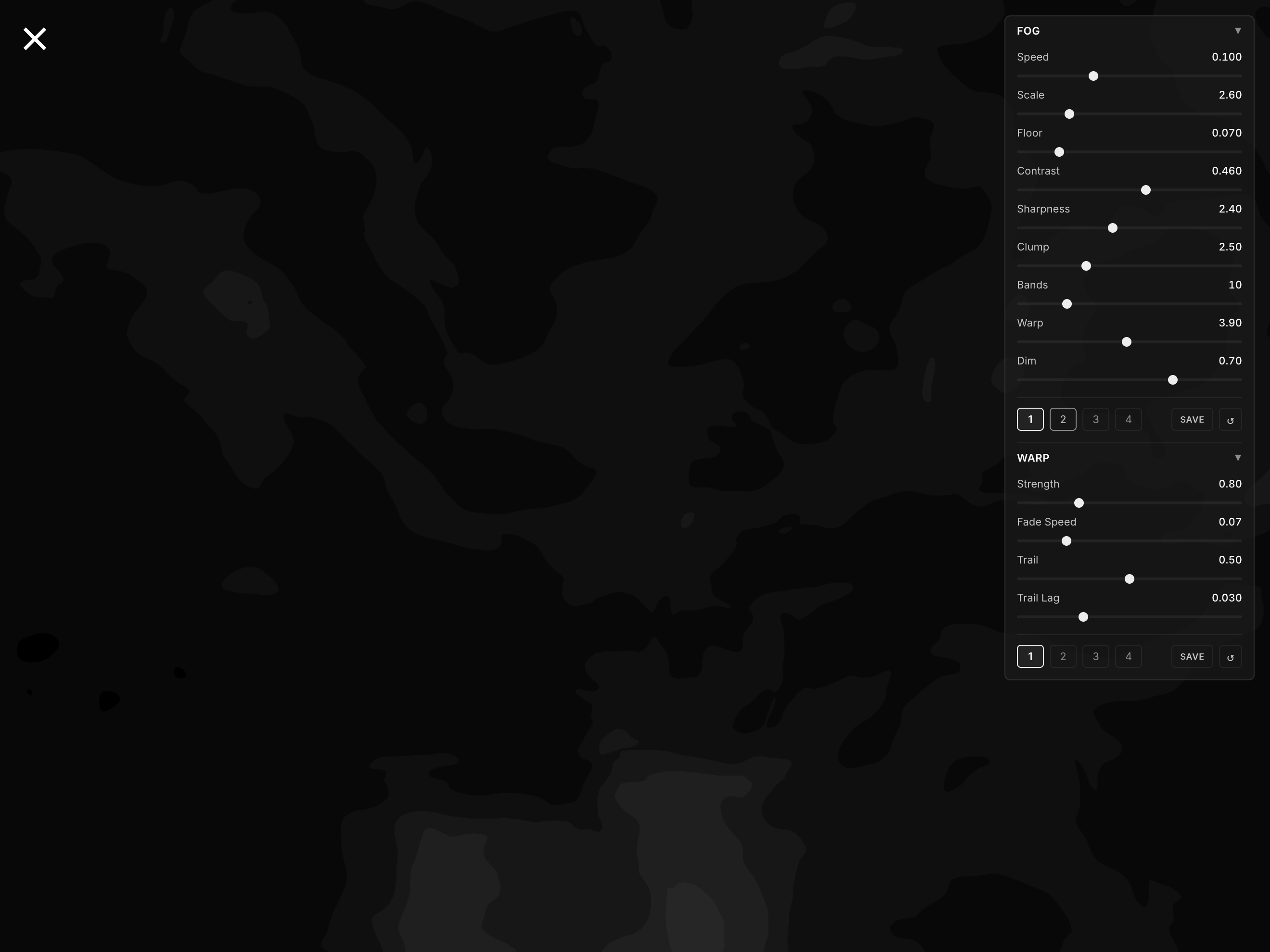
Parameters
- Scale: how zoomed in the noise pattern is
- Speed: how fast it drifts
- Warp: how much the noise folds back on itself (more organic, swirling shapes)
- Floor: the minimum brightness of the fog
- Contrast: how much difference there is between light and dark areas
- Sharpness: how defined the edges of the fog shapes are
- Clump: adds a second noise pass, giving the fog a heavier, massed quality
- Bands: how finely the fog is shaded (lower values separate it into distinct layers)
- Dim: a black transparent filter over the whole effect (darkens it without changing the shape)
Want to play around with the fog and warp settings yourself? Visit the settings page.
Mouse interaction
Clicking and holding anywhere on the page distorts the fog toward the cursor, as if dragging a finger through water. Up to 5 points can be active at once - one per finger - so it works with multi-touch too. When all five are taken, the weakest one gets recycled.
The feel took some iteration too. The first version switched on and off instantly, which felt abrupt, so I added a smooth fade-in on press and fade-out on release. Then came a trailing effect - the distortion follows the exact path the cursor travelled with a short delay, replayed from a recording of its last 256 positions.
What's next
This was my first time writing a shader and it was fun! I'd like to build another, more complex one in the future. There's a lot more to explore with GLSL.