Loading post.
21 June 2026
The CMS admin panel
Wiring up Payload, Neon and Cloudinary to upload photos without code.
The problem
My previous site was on GitHub Pages where photos were hardcoded in HTML files. Adding a new one meant opening a code editor, editing a file, committing, and pushing. That ended up being enough friction to stop me from updating the site as often as I'd like.
What's a CMS and why Payload
A CMS (content management system) is software that lets you manage website content through an interface instead of code - like an admin panel where you log in, upload a photo, fill in some fields, and it handles the rest.
Payload ended up being the obvious candidate. It's free, open-source, and installs as a plugin inside the existing Next.js app. The admin panel lives at /admin in the same repo and deploys with the website build. Underneath it, Payload needs two things: a database to keep metadata, and somewhere to store the actual files. For those, I used Neon and Cloudinary.
The services
- Payload CMS: the admin panel and content layer, installed as a Next.js plugin
- Neon: a cloud Postgres database (Postgres is a type of relational database; Neon hosts it with a free tier)
- Cloudinary: cloud storage for images, with on-the-fly resizing via URL parameters
The URL resizing is why Cloudinary made sense here specifically. The gallery views I was planning would have photos changing their size dynamically depending on the layout and zoom level. Being able to request any size at the URL level - rather than pre-generating fixed sizes at build time - meant the image delivery could stay performant regardless of what the gallery was doing.
Data model, data flow, and APIs
Two collections in Payload:
- Media: one entry per uploaded photo. File goes to Cloudinary, metadata (alt text, dimensions, Cloudinary URL) goes to Neon.
- Albums: ordered lists of photos. Stores a title, slug, and references to Media entries.
When a photo is uploaded through the admin, the file routes to Cloudinary and the metadata lands in Neon. When the gallery page loads, it reads that metadata from Neon using Payload's local API - a direct function call rather than a network request, which means no extra latency from going through an external endpoint.
Connecting the services required API keys - secret credentials each service gives you to prove requests are coming from your account. The setup: get the key from the service's dashboard, paste it into a local .env.local file (gitignored, never goes to GitHub), and reference it in the config. Both services needed keys locally; Vercel holds its own copies for the deployed site.
Neon has an official Payload adapter, so connecting it was straightforward. Cloudinary is different - Payload doesn't have built-in support for external file storage, so it needs a plugin. Finding the right one took longer than expected. I had Claude search GitHub and suggest a few options, none of which worked reliably. One plugin failed five different ways before I gave up on it - the worst quietly saved uploads to local disk instead of Cloudinary, with no error at all. The one that actually worked I found by accident: a link on Cloudinary's own Twitter account pointing to a YouTube video about a plugin called payload-storage-cloudinary. Whether it's officially supported or just officially endorsed I'm not sure, but it's the one that worked.
The default admin
Once everything was wired up the admin was working - login, upload a photo, save an album. Technically correct, but the UI left something to be desired.
Payload's default media collection shows photos as a list of filenames with no thumbnails. The album editor shows photos as collapsible rows labelled "Photo 01, Photo 02" with a text-only picker inside each. No way to see what you were selecting, no way to see how an album looked as a whole. Two things needed building.
MediaGridView
A custom component that adds a grid/list toggle to the media library. The list mode closely resembles Payload's default but adds thumbnails. The grid mode is more useful: thumbnail cards, infinite scroll, checkboxes for bulk actions, and a small note under each card showing which albums a photo already belongs to. That last detail turned out to be the most practical addition - at a glance you can see if a photo is already placed somewhere.
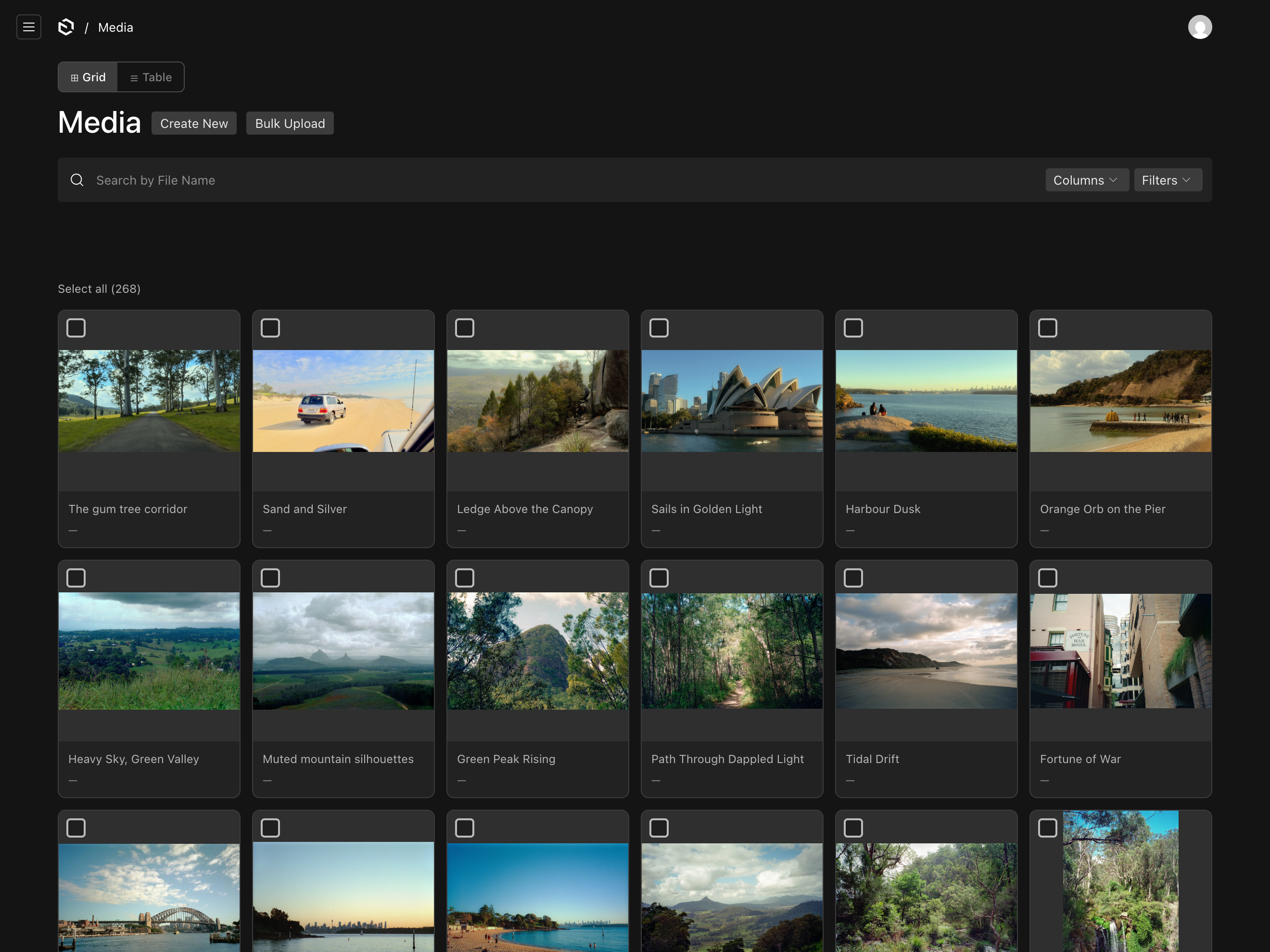
Payload has a slot system that lets you inject a component above a collection's list (beforeList). Getting the positioning right took a few attempts - the toggle kept landing in the wrong place relative to Payload's own header. Injecting into Payload's admin means inserting into HTML you don't fully control, and the fix ended up being CSS's order property: visually reorder the elements without touching the underlying HTML structure.
PhotoGridField
A custom field added to the Albums collection that replaces the default row-by-row photo list with a thumbnail grid. The native list stays accessible - the grid sits above it as an alternative interface for the same data. Features: drag to reorder (including touch), a remove button per card, and a photo picker modal with checkboxes to add multiple photos at once.
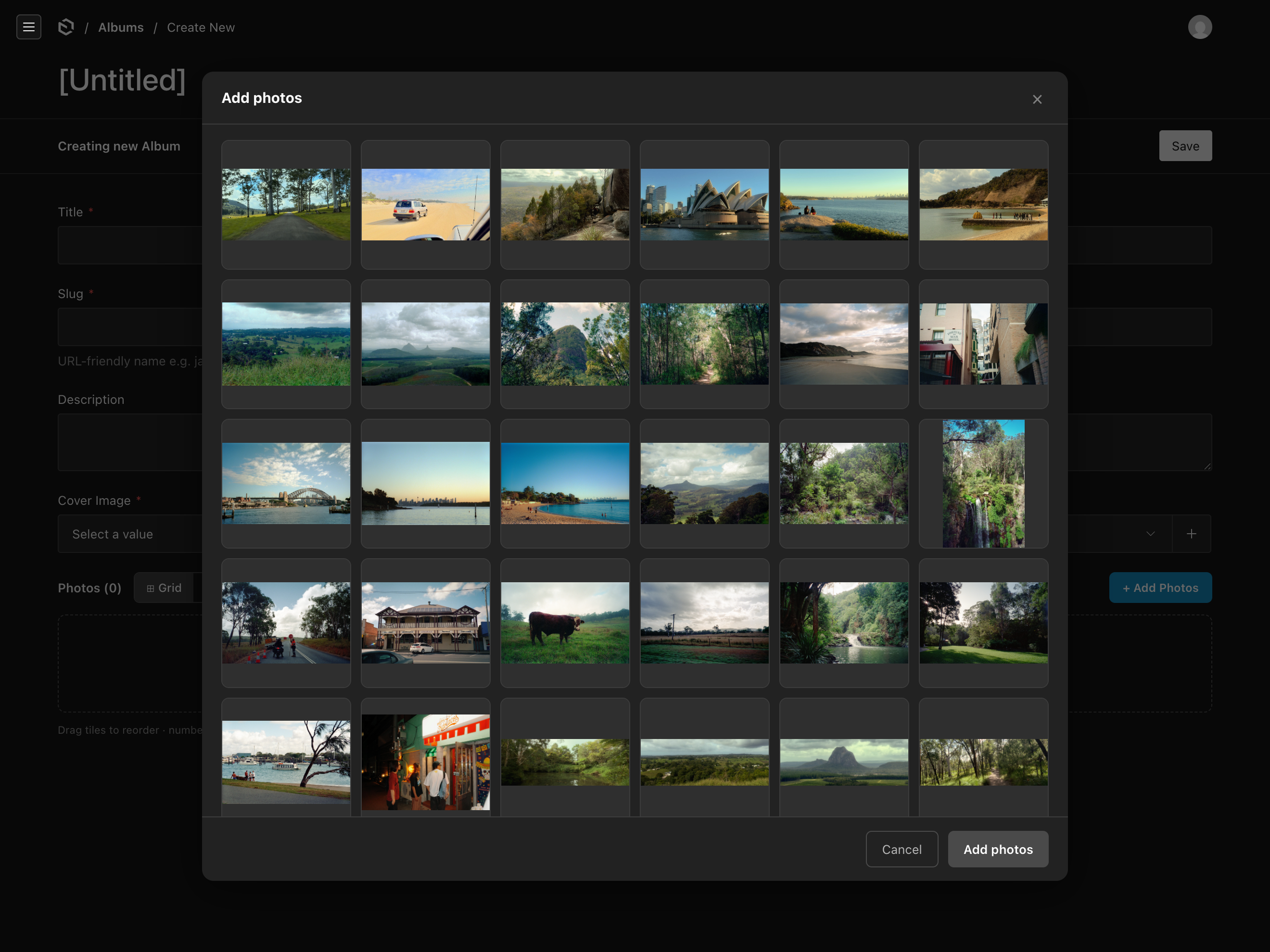
A couple of things caught me out during development:
- Payload's built-in
addFieldRowonly creates an empty row - filling it in meant dispatching a lower-levelADD_ROWaction that isn't in the public docs. importMap.jsis a file Payload generates to register custom components - it regenerates on dev server start but has to be committed to git, or the components won't load in production. Easy to miss.
Where things landed
Both components are still fairly rough around the edges, but even the early versions are significantly more usable than Payload's defaults, especially for uploading photos. There's room to polish - better drag feedback, smarter bulk actions, a few visual details. But the core problem is solved: photos can be uploaded and organised without touching code.